How to Choose a Surge Protector by Joule Rating
Almost every power strip sold looks the same from the outside, and almost none of the words on the packaging tell you what it does. The number that matters is printed in joules, and once you know how to read it the choice becomes straightforward.
What a joule rating actually measures
A surge protector works by diverting excess voltage away from your equipment into components called metal oxide varistors. Those components absorb energy, and they wear out as they do it. The joule rating is the total amount of surge energy the unit can absorb over its whole life before it stops protecting anything.
That is the crucial part: the rating is cumulative, not per-event. A strip rated at 1080 joules does not absorb 1080 joules every time; it absorbs 1080 joules in total, spread across every spike it ever sees, and then it is finished.
This is why a higher rating is not simply better protection at the moment of a strike — it is a longer working life before the unit quietly becomes an ordinary extension lead.
Ratings to look for by use case
For a single lamp, a phone charger or a clock radio, anything from around 200 to 600 joules is adequate. The connected equipment is inexpensive and the consequence of failure is small.
For a desktop computer, a monitor and peripherals, look for 1000 joules or more. A modern desk setup often represents a couple of thousand dollars of equipment sharing one outlet, and it deserves a strip that will still be working in five years.
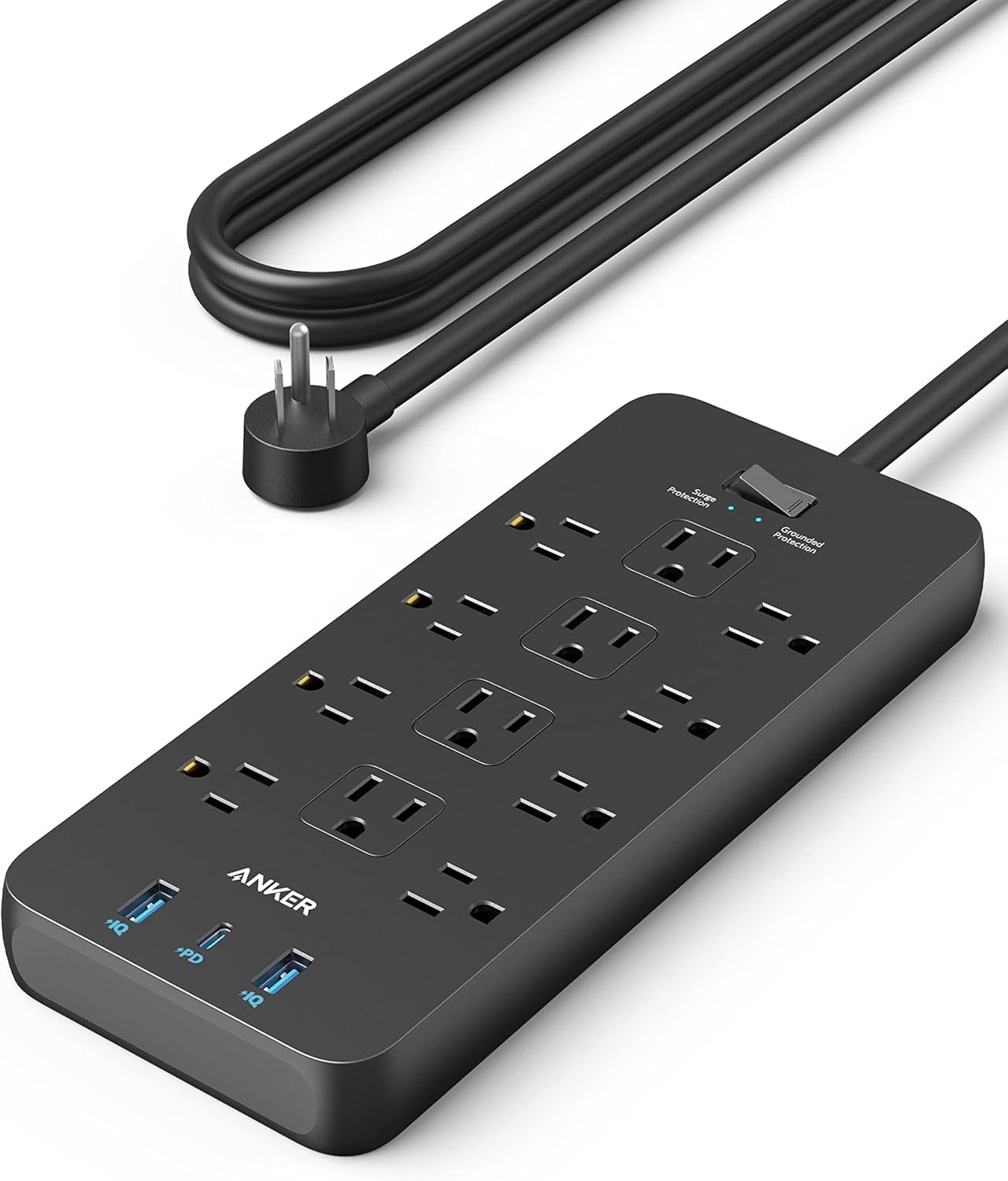
For a television wall, an AV receiver, a games console and a network switch, 2000 joules or above is a reasonable target. The Anker 2100 joule strips we stock sit in this band, and the extra headroom translates directly into working life.
Clamping voltage and response time
Clamping voltage is the level at which the protector begins to divert. Lower is better: a unit that clamps at 330 volts starts working sooner than one that clamps at 500. UL rates clamping in three bands, and 330V is the best commonly available.
Response time is how quickly the diversion happens, usually quoted in nanoseconds. In practice almost all modern units respond fast enough that the difference is academic compared to the joule rating and clamping voltage.
If a package quotes none of these three numbers, that absence is itself information. Manufacturers who have good figures print them.
The indicator light that most people ignore
Better strips carry a protected or grounded indicator LED. When the varistors have been consumed, that light goes out while the outlets keep supplying power. The strip continues to work as an extension lead and offers no protection at all.
Nothing warns you about this. Check the indicator occasionally, particularly after a storm or a local outage, and treat an unlit protection LED as a unit that needs replacing.
A strip with no indicator gives you no way to know its state, which is a reason to prefer one that has it.
Outlet spacing and the wall-wart problem
The most common practical frustration with a power strip is that plug-in transformers block adjacent outlets. Look for units with spaced outlets, rotating sockets, or a couple of widely spaced positions specifically designed for bulky adapters.
Count the outlets you actually need and add two. A strip run at full capacity from day one guarantees a second strip daisy-chained off it within a month, which is both a fire risk and a protection problem.
Never daisy-chain surge protectors. Each unit expects to see the wall, and chaining them defeats the grounding path the protection depends on.
Cord length and gauge
A braided five-foot cord will reach further than you expect and survive being dragged along a desk edge. Where you need more reach, choose a longer cord on the strip rather than adding an extension lead in front of it.
Wire gauge matters at higher loads. A 14 AWG cord carries more current with less voltage drop than a 16 AWG one. For a desk of low-draw electronics this is not a concern; for anything with a motor or a heating element it is.
Heating appliances should not go on a surge strip at all. Space heaters, kettles and irons draw enough current to trip or overheat a strip designed for electronics.
Outlet extenders versus strips
A wall-mount outlet extender with USB ports is the tidier answer where the equipment is close to the wall and there is no need to route a cord. It also avoids the trailing cable that a strip creates in a walkway.
The trade-off is weight. A heavily loaded extender hangs off the receptacle and, in an older outlet with worn contacts, can work loose over time. Where you are plugging in several bulky adapters, a strip on the floor is mechanically safer.
Check whether an extender includes surge protection at all. Many do not, and the joule rating — or its absence — will tell you.
When to replace, and what to keep
Replace a surge protector after any event that visibly tripped it, after roughly three to five years of normal service, or as soon as the protection indicator goes out. The outlets outliving the protection is the normal failure mode.
Keep the old unit as a plain extension lead if you like, but label it, because an unlabelled dead protector will inevitably end up back under a desk protecting nothing.
If your equipment matters and your building has had outages, a strip is the cheapest insurance in the room. Ours are listed with their joule ratings on the product page rather than in a data sheet you have to hunt for.
Where to go next
Every surge strip and outlet extender we stock lists its joule rating on the product page. Ask us if you need a recommendation for a specific setup.
Shop Power & Surge Protection
Related articles